
Like Us Like Us Facebook Subscribe Subscribe us YouTube Whatsapp Share us Whatsapp Query Send your queries

Celebrating Innovation: KHTML, The Engine Behind Giants

Celebrating Innovation: KHTML, The Engine Behind Giants

Celebrating Innovation: KHTML, The Engine Behind Giants, KHTML: The Little Browser Engine That Powered the Web’s Giants, In the world of web browsers, names like Chrome, Safari, and Firefox dominate the conversation. Their rendering engines—Blink and Gecko—are household names in the tech community. But there’s a quiet, unassuming hero in this story, an engine whose code forms the foundational DNA of much of the modern web: KHTML.

Long before it was cool, KHTML was there, powering a revolution from the shadows. This is the story of the little open-source project that could, and how it changed the internet forever.
KHTML The Little Browser Engine

What Exactly is KHTML?

KHTML was the HTML rendering engine developed by the KDE project for its Konqueror web browser. First released in 1998, it was a core component of the K Desktop Environment on Linux and other Unix-like operating systems.

For its time, KHTML was remarkably advanced. It was:

  • Fast and Lightweight: Written in C++, it was designed for speed and efficiency, a stark contrast to some of the bulkier competitors of the era.
  • Standards-Compliant: The KDE team was deeply committed to web standards, ensuring KHTML correctly rendered HTML, CSS, and the nascent Document Object Model (DOM).
  • Open Source: Released under the GNU Lesser General Public License (LGPL), its code was free for anyone to view, use, and modify.

While Konqueror remained a niche browser, beloved by the Linux community, KHTML’s technical excellence was about to catch the eye of a tech giant.

The Big Break: Apple’s Masterstroke Apple Webkit

In the early 2000s, Apple was relying on the aging Internet Explorer for Mac as its default browser. They needed a modern, fast, and standards-compliant engine for their new browser, which would become Safari.

Instead of building one from scratch—a monumental task—Apple’s engineers went shopping in the open-source world. They evaluated Gecko (from Mozilla) and KHTML. To everyone’s surprise, they chose the underdog.

KHTML’s clean, well-architected codebase was a major factor. It was a solid foundation that Apple could build upon. In 2002, Apple announced they were forking KHTML to create a new engine called WebKit.

From KHTML to WebKit: A Revolution is Born

The “Kit” in WebKit is a direct nod to its origins. Initially, it was a fork, but Apple soon began contributing its changes back to the KDE project. This relationship was sometimes rocky, as Apple’s rapid, private development pace clashed with KDE’s open, methodical process. Despite the challenges, this collaboration was a landmark event in open-source history.

WebKit, supercharged by Apple’s resources, quickly evolved. Its performance and standards support made it a star. Safari’s success on macOS and, later, the iPhone, cemented WebKit as a mobile web powerhouse.

The Domino Effect: How KHTML Changed Everything

The story doesn’t end with Safari. The ripple effects of KHTML are almost everywhere you look online.

  • Google Chrome: When Google decided to build its own browser in 2008, it didn’t start from scratch. It used WebKit as its rendering engine. For the first five years of its life, Chrome was a WebKit-based browser.
  • Blink: In 2013, Google forked WebKit to create its own engine, Blink. Blink is now the engine behind Chrome, Microsoft Edge, Opera, and a vast majority of browsers worldwide.

The Modern Mobile Web: Every browser on iOS (including Chrome and Firefox) is required by Apple to use WebKit. This means that a significant portion of all mobile web browsing is still powered by the descendant of KHTML.

So, when you use Chrome, Edge, or Safari, or when you browse the web on your iPhone, you are interacting with the direct legacy of a humble project from the KDE community.
A Legacy of Open Source Triumph

The story of KHTML is a powerful testament to the open-source model. It proves that a dedicated community of developers, working without the backing of a major corporation, can create technology so good that it becomes the bedrock for the world’s most popular software.

KHTML may not be a name on everyone’s lips, but its influence is woven into the very fabric of the web. It’s the ultimate “little engine that could”—a project that started in the halls of the open-source community and ended up powering the web’s giants.

If you have and query or suggestion or need assistance  then please contact me, I will reply to fix your problem, if you like our content then you can subscribe to our Youtube channel. If you want to hire me then reach us at our Fiverr.

Why SuperTuxKart 1.5 is the Best Choice for Free Kart Racing

Why SuperTuxKart 1.5 is the Best Choice for Free Kart Racing

Why SuperTuxKart 1.5 is the Best Choice for Free Kart Racing Enthusiasts, SuperTuxKart 1.5 represents a significant milestone in the evolution of free, open-source gaming. What started as a simple kart racing game has transformed into a feature-rich, professionally polished experience that rivals many commercial titles. With its latest update, SuperTuxKart continues to prove that free software can deliver exceptional quality and endless entertainment. Whether you’re a casual gamer looking for some weekend fun or a hardcore racing enthusiast, SuperTuxKart 1.5 offers something for everyone.

SuperTuxKart 1.5

What’s New in Version SuperTuxKart 1.5

The rendering system has been completely overhauled with:

  • Enhanced Graphics Engine
  • Improved dynamic lighting and shadows
  • Real-time environmental reflections
  • Enhanced particle effects for better explosions and smoke
  • Higher resolution textures across all tracks
  • Improved anti-aliasing for smoother edges

New Racing Content in SuperTuxKart 1.5 introduces exciting new elements:

  • 5 Brand New Tracks: Including “Arctic Adventure,” “Tropical Temple,” and “Space Station Omega”
  • 3 New Characters: Featuring “Wilber the Wizard” and “Sara the Scientist”
  • Special New Items: Quantum Bomb and Time Warp power-ups
  • Enhanced Battle Arenas: Larger maps with more strategic elements

Multiplayer Revolution

The online experience has been completely transformed:

  • Support for up to 12 players in online matches

  • Improved matchmaking system with skill-based ranking

  • Reduced latency with better netcode

  • Cross-platform multiplayer between Windows, Linux, and macOS

Key Features That Shine

Completely Free and Open Source

Unlike commercial racing games that can cost $60+, SuperTuxKart is completely free. The source code is available for anyone to modify, ensuring the game will continue to evolve through community contributions.

Cross-Platform Compatibility

  • Windows 10/11 – Full native support

  • Linux – Available in most distribution repositories

  • macOS – Optimized for Apple Silicon and Intel Macs

  • Steam Deck – Verified and fully compatible

Accessible Game play

  • Easy to Learn: Simple controls perfect for beginners

  • Challenging to Master: Advanced techniques for competitive players

  • Adjustable Difficulty: AI that adapts to your skill level

  • Local Multiplayer: Split-screen fun for up to 4 players

System Requirements for SuperTuxKart 1.5

ComponentMinimumRecommended
OSWindows 7 / Linux / macOS 10.12Windows 10 / Linux / macOS 11
CPUDual-core 2.0 GHzQuad-core 3.0 GHz
RAM2 GB4 GB
GPUOpenGL 3.3 compatibleOpenGL 4.0 compatible
Storage700 MB1.5 GB

How to install SuperTuxKart 1.5

You can download it from their official website https://supertuxkart.net/Download for Windows, Linux and Mac, on  Linux you can install also from their app store, Falthub or command line, if you want to know from any particular Linux distro, please comment I will share installation process.

Why Choose SuperTuxKart 1.5?

Pros

  • Zero Cost: Completely free with no micro transactions

  • Regular Updates: Active development with frequent improvements

  • Family Friendly: Appropriate for all age groups

  • Modding Support: Active modding community with custom content

  • Lightweight: Runs smoothly on older hardware

Cons

  • Smaller Community: Fewer players than commercial alternatives

  • Limited Brand Recognition: No famous character licenses

  • Simpler Graphics: While improved, still not AAA quality


Create a BMI Calculator Command Line Using Python Functions

Create a BMI Calculator Command Line Using Python Functions

Create a BMI Calculator Command Line Tool Using Python Functions, in this tutorial you will learn how to build a command-line BMI calculator using Python functions. This tutorial covers Python basics, function creation, and command-line interface development.

In today’s world of health consciousness, Body Mass Index (BMI) remains a widely used metric to categorize individuals based on their weight and height. What better way to practice Python programming than by creating a practical tool? In this tutorial, we’ll build a command-line BMI calculator using Python functions.

BMI Calculator GUI Tutorial Python Tkinter BMI Calculator using Java BMI Calculator using Java Script

What is BMI? BMI is calculated using the formula:

bmi = (weight * 10000) / (height * height)

Note:  Weight in KG and Height in CM
The resulting value falls into categories:

Underweight: BMI < 18.5
Normal weight: 18.5 ≤ BMI < 24.9
Overweight: BMI > 24.9

Create a BMI Calculator Command Line Using Python Functions

Building Our BMI Calculator

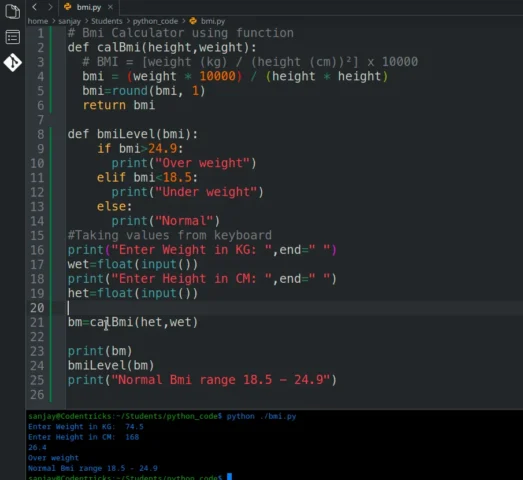
Let’s create a Python script that calculates BMI based on user input and provides the corresponding category. create a file name bmi.py.

Create a BMI Calculator Command Line  Using Python Functions Code

# Bmi Calculator using function
def calBmi(height,weight):
  # BMI = [weight (kg) / (height (cm))²] x 10000
  bmi = (weight * 10000) / (height * height)
  bmi=round(bmi, 1)
  return bmi

def bmiLevel(bmi):
    if bmi>24.9:
      print("Over weight")
    elif bmi<18.5:
      print("Under weight")
    else:
      print("Normal")
#Taking values from keyboard
print("Enter Weight in KG: ",end=" ")
wet=float(input())
print("Enter Height in CM: ",end=" ")
het=float(input())

bm=calBmi(het,wet)

print(bm)
bmiLevel(bm)
print("Normal Bmi range 18.5 - 24.9")

Run bmi.py:  Open Command Prompt / Terminal / konsole and navigate to directory having file bmi.py, and run command given below

python ./bmi.py

or

python3 ./bmi.py

If you have and query or suggestion or need assistance  then please contact me, I will reply to fix your problem, if you like our content then you can subscribe to our Youtube channel. If you want to hire me then reach us at our Fiverr.

Linux AWK command Tutorial for Beginners | Learn AWK with Examples

Linux AWK command Tutorial for Beginners | Learn AWK with Examples

Linux AWK command Tutorial for Beginners | Learn AWK with Examples, learn Step-by-step AWK tutorial for Linux beginners. Learn AWK command syntax, patterns, and examples to process text and data efficiently in Linux.

In Linux, text processing is one of the most powerful tasks that system administrators and developers perform on a daily basis. Among the many command-line tools available, AWK stands out as one of the most versatile and powerful utilities for pattern scanning and processing. This tutorial will guide you through the basics of the AWK command in Linux, its syntax, and practical examples to help you master it.

Linux AWK command Tutorial for Beginners

What is Linux AWK command

The awk command in Linux is not an acronym with a “full form” in the traditional sense of standing for a specific phrase or set of words describing its function. Instead, awk is named after the initials of its three original developers:

  • A – lfred Aho
  • W – einberger (Peter Weinberger)
  • K – ernighan (Brian Kernighan)

Basic syntex of Linux AWK command

awk 'pattern { action }' filename
  • Pattern – Defines what to search for in each line.
  • Action – Defines what to do if the pattern matches.
  • Filename – The input file to process.

Note: If no pattern is given, AWK performs the action on all lines. If no action is given, AWK prints the matching line by default.

awk command list List files with sizes

# List files with sizes
ls -l | awk '{print $9, $5}'

Learn AWK with Examples

1. Print All Lines

awk '{ print }' file.txt

2. Print Specific Column

awk '{ print $1, $3 }' file.txt

3. Print Line Numbers

awk '{ print NR, $0 }' file.txt

4. Conditional Pattern Matching

awk '/error/ { print }' log.txt

5. Print Lines Based on Condition

awk '$3 > 50 { print $1, $3 }' marks.txt

Real-World Examples of AWK

Example 1: Summing a Column

awk '{ sum += $2 } END { print "Total:", sum }' sales.txt

Example 2: Average Calculation

awk '{ total += $3; count++ } END { print "Average:", total/count }' marks.txt

Example 3: Replace Field Separator

awk 'BEGIN { FS=":"; OFS=" - " } { print $1, $2 }' /etc/passwd

AWK Built-in Variables

VariableMeaning
$0Whole line
$1, $2…Specific column/field
NRNumber of records (lines)
NFNumber of fields in the current line
FSField separator (default is space)
OFSOutput field separator
RSRecord separator
ORSOutput record separator

Why Use AWK Linux commans?

  • Quick and efficient for log analysis.
  • Ideal for column-based data manipulation.
  • Works well in shell scripting.

Lightweight alternative to Python or Perl for simple text tasks.

Conclusion

The AWK command in Linux is a must-know tool for anyone working with text, data files, or system administration. With its pattern scanning and processing power, it allows you to filter, format, and analyze data efficiently. By practicing the examples above, you’ll be well on your way to mastering AWK for real-world use cases.

If you have and query or suggestion or need assistance  then please contact me, I will reply to fix your problem, if you like our content then you can subscribe to our Youtube channel. If you want to hire me then reach us at our Fiverr.
How to make WordPress website faster – 10 Proven Speed Optimization Tips

How to make WordPress website faster – 10 Proven Speed Optimization Tips

In this post I are going to discuss how to make WordPress website faster with 10 proven speed optimization tips. A WordPress website faster is super important for SEO, user experience, and conversions . Here’s a complete step-by-step guide for WordPress speed optimization you can follow:

Make WordPress Website Faster

10 proven speed optimization tips to make WordPress website faster

1. Choose a Fast WordPress Hosting Provider

Your hosting provider plays a huge role in website speed. Avoid shared hosting if possible and opt for:

  • Managed WordPress hosting (e.g., Kinsta, WP Engine)
  • VPS or Cloud hosting (Recommended for better Google Page Speed, GTmetrix and for Core Web Vitals)

If you are using shared hosting then you can expect Google page speed of 80 with customization.

2. Use a Lightweight WordPress Theme

Avoid bloated themes with excessive features. Instead, choose optimized themes. You can choose lighter theme like Astra with Page Speed score of 90+ score.

3. Optimize Images Before Uploading

Large images slow down your site. Use:

  • Compression tools (Gimp, Photoshop, TinyPNG, ShortPixel)
  • Lazy loading
  • use WebP format

4. Avoid using Heavy resourses

If you are using heavy resources like larger slider images, multiple high quality images, longer page with multiple section will also slow down your website.

5. Enable Caching

Install a caching plugin:

  • LiteSpeed Cache (best if your host supports LiteSpeed server).
  • WP Rocket (premium, easiest setup).
  • W3 Total Cache or WP Super Cache (free alternatives).

6. Minify & Combine Files

  • Minify CSS, JS, and HTML using your caching plugin.
  • Use defer or async loading for JavaScript.
  • Remove unused CSS/JS with plugins like Asset CleanUp or Perfmatters.

Use cache plugins to achieve this but remember it can break your website look also.

7. Use a Content Delivery Network (CDN)

A CDN distributes your content across global servers, speeding up delivery. Popular options:

  • Cloudflare (free & premium plans)
  • Bunny.net, KeyCDN, or StackPath for advanced performance.

8. Upgrade to PHP 8.0+ : Newer PHP versions are significantly faster.

9. Reduce Plugins

  • Deactivate and delete plugins you don’t use.
  • Replace heavy plugins with lightweight alternatives

Note: If you have installed woo commerce then you will also see performance drop.

10. Reduce External HTTP Requests

Each external script (Google Fonts, ads, analytics) adds load time.

Final Thoughts

A faster WordPress website improves SEO, user experience, and conversions. By following these 10 speed optimization tips, you can significantly reduce load times and keep visitors engaged.

Which tip helped you the most? Let us know in the comments!

If you have and query or suggestion or need assistance  then please contact me, I will reply to fix your problem, if you like our content then you can subscribe to our Youtube channel. If you want to hire me then reach us at our Fiverr.
Intel Core i5-10400F vs i3-12100F: Which Budget CPU Should You Choose?

Intel Core i5-10400F vs i3-12100F: Which Budget CPU Should You Choose?

Intel Core i5-10400F vs i3-12100F: Performance, Gaming, and Value Compared, Wondering whether to pick the Intel Core i5-10400F (6-core) or i3-12100F (4-core)? We compare benchmarks, gaming performance, power efficiency, and value to help you decide.

Choosing the right budget CPU can be tricky, especially when comparing older but higher-core-count options like the Intel Core i5-10400F with newer but fewer-core alternatives like the Intel Core i3-12100F. Both processors offer excellent value, but they cater to slightly different needs.

Intel Core i5-10400F vs i3-12100F

In this comparison, we’ll break down their specs, gaming performance, productivity benchmarks, power efficiency, and overall value to help you decide which one is best for your build.

Intel Core i5-10400F vs i3-12100F Specifications Overview

FeatureIntel Core i5-10400FIntel Core i3-12100F
Release DateApril 2020January 2022
ArchitectureComet Lake (14nm)Alder Lake (Intel 7nm)
Cores/Threads6 / 124 / 8
Base Clock2.9 GHz3.3 GHz
Boost Clock4.3 GHz4.3 GHz
L3 Cache12MB12MB
TDP65W58W
PCIe Version3.05.0
Memory SupportDDR4-2666DDR4-3200 / DDR5-4800
Price (MSRP)₹6999₹8000

Intel Core i5-10400F vs i3-12100F Key Differences:

  • Core Count: The i5-10400F has 6 cores and 12 threads, while the i3-12100F has 4 cores and 8 threads.

  • Architecture: The i3-12100F is based on Intel’s newer Alder Lake architecture, offering better IPC (Instructions Per Cycle) and efficiency.

  • Memory & PCIe Support: The i3-12100F supports DDR5 and PCIe 5.0, while the i5-10400F is limited to DDR4 and PCIe 3.0.

  • Power Efficiency: The i3-12100F has a lower TDP (58W vs 65W) and better performance-per-watt

Intel Core i5-10400F vs i3-12100F Performance Benchmarks

1. Single-Core Performance

The i3-12100F dominates in single-core tasks due to its newer Golden Cove architecture. In Geekbench 6, it scores 2712 points compared to the i5-10400F’s 1459 points—an 86% lead .

This makes the i3-12100F better for:

  • Gaming (especially at 1080p)

  • Light productivity tasks (Office, web browsing)

  • Emulation & older games that rely on single-thread performance

2. Multi-Core Performance

The i5-10400F pulls ahead in heavily threaded workloads thanks to its extra two cores and four threads. In Cinebench R23, it scores ~15% higher in multi-core tests.

This makes the i5-10400F better for:

  • Video editing & rendering

  • Streaming while gaming

  • Multi-tasking with multiple applications open

3. Gaming Performance

  • 1080p Gaming: The i3-12100F often matches or beats the i5-10400F due to its superior single-core performance. In Tom’s Hardware tests, it delivered 88% of the i5-12400’s performance at half the price .

  • 1440p & 4K Gaming: Both CPUs perform similarly since the GPU becomes the bottleneck.

4. Power Efficiency

The i3-12100F is more efficient, consuming 11% less power while delivering better single-core performance

Value & Which One Should You Buy?

Choose the i3-12100F if:

✅ You prioritize gaming performance (especially at 1080p).
✅ You want a newer platform (PCIe 5.0, DDR5 support).
✅ You prefer lower power consumption.
✅ You’re on a tight budget (often cheaper than the i5-10400F).

Choose the i5-10400F if:

✅ You need more cores for multi-threaded workloads.
✅ You already have a Comet Lake-compatible motherboard.
✅ You find it at a significant discount (used market).

Final Verdict

The Intel Core i3-12100F is the better choice for most budget gamers thanks to its superior single-core performance, efficiency, and newer features like PCIe 5.0. However, if you frequently use multi-core applications, the i5-10400F still holds up well.

For future-proofing, the i3-12100F is the clear winner, but if you can find the i5-10400F at a steep discount, it remains a viable option.

If you have and query or suggestion or need assistance  then please contact me, I will reply to fix your problem, if you like our content then you can subscribe to our Youtube channel. If you want to hire me then reach us at our Fiverr.

13 Basic Linux Commands Every Beginner Should Know

13 Basic Linux Commands Every Beginner Should Know

Learn the 13 most essential Linux commands for beginners! Master basic file navigation, system info, and file management in the Terminal / Konsole.

Linux is a powerful operating system widely used in servers, development, and even everyday computing. If you’re new to Linux, mastering the terminal is a crucial skill. Here are 13 basic Linux commands that every beginner should know.

13 Basic Linux Commands

1. PWD Basic Linux Command – Print Working Directory

Shows the current directory you’re in, run the Linux command given below in Terminal / Konsole.

pwd

2. ls – Most used basic Linux command

ls stands for list directory, Displays files and folders in the current directory.

ls  
ls -l  # Detailed list  
ls -a  # Shows hidden files 

3. cd – Change Directory

Navigates between folders.
bash

cd /path/to/directory  
cd ..  # Go back one directory  
cd ~   # Go to home directory  

4. mkdir – Create a Directory

Makes a new folder.

mkdir new_folder  

5. rm – Remove Files or Directories

Deletes files or folders (use with caution!).

rm file.txt  
rm -r folder  # Recursive delete (for directories)  

6. cp – Copy Files or Directories

Copies files from one location to another.

cp file.txt /destination/  
cp -r folder /destination/  # Copy directories  

7. mv – Move or Rename Files

Moves files or renames them.

mv file.txt /new/location/  
mv oldname.txt newname.txt  # Rename  

8. cat – Display File Content

Shows the contents of a file.

cat file.txt  

9. grep – Search Text in Files

Finds specific text patterns.

grep "search_term" file.txt  

10. chmod – Change File Permissions

Modifies read, write, and execute permissions.

chmod 755 script.sh  # Sets executable permissions  

11. sudo – Execute as Superuser

Runs commands with administrative privileges.

sudo apt update #ubuntu  
sudo dnf update #fedora
sudo zypper update #opensuse

12. top / htop – Monitor System Processes

Displays running processes and system stats.

top  
htop  # More user-friendly (may need installation)  

13 Basic Linux commands- man :

Access Command Manuals

Shows help for any command.

man ls  

Final Thoughts

These 13 basic Linux commands are essential for navigating and managing files in the terminal. As you get comfortable, you can explore more advanced commands and scripting.

Which command do you use the most? Let us know in the comments!

If you have and query or suggestion or need assistance  then please contact me, I will reply to fix your problem, if you like our content then you can subscribe to our Youtube channel. If you want to hire me then reach us at our Fiverr.

KDE Plasma 6.5 Now Supports Auto Day/Night Theme Switching

KDE Plasma 6.5 Now Supports Auto Day/Night Theme Switching

The latest KDE Plasma 6.5 update brings an exciting new feature—automatic day/night theme switching! This long-awaited functionality allows your Linux Desktop to dynamically adjust between light and dark themes based on sunrise and sunset times or a custom schedule.

KDE Plasma 6.5’s new auto day/night theme switching

How Auto Day/Night Theme Switching Works

Plasma 6.5 introduces a built-in option to automatically switch between light and dark themes. You can configure it in two ways:

  • Based on Sunrise/Sunset – Uses your system’s geolocation to determine daylight hours.
  • Custom Schedule – Set specific times for theme changes manually.

How to Enable Auto Theme Switching

Open System Settings → Appearance → Global Theme.

Under Theme Mode, select Automatic (follows day/night cycle).

Choose whether to use sunset/sunrise or set a custom time.

Why Auto Day/Night Theme Feature Matters

  • Reduces Eye Strain – Automatically switches to dark mode at night.
  • Seamless User Experience – No more manual theme changes.
  • Better Integration – Works with Kvantum, Konsole, and most KDE apps.

Available in KDE Plasma 6.5

This feature is part of Plasma 6.5, which includes numerous other improvements like enhanced Wayland support, smoother animations, and better multi-monitor handling.

Are you excited about auto theme switching in KDE Plasma? Let us know in the comments!

If you have and query or suggestion or need assistance  then please contact me, I will reply to fix your problem, if you like our content then you can subscribe to our Youtube channel. If you want to hire me then reach us at our Fiverr.
Implementation of Inheritance in C++ – Syntax & Example Code

Implementation of Inheritance in C++ – Syntax & Example Code

Implementation of Inheritance in C++ – Syntax & Example Code, Learn how to implement inheritance in C++ with a practical example. Understand single, multiple, multilevel, and hierarchical inheritance in C++ programming.

inheritance in C++

Introduction to Inheritance in C++

Inheritance is one of the core principles of Object-Oriented Programming (OOP) in C++. It allows a class (derived class) to inherit properties and methods from another class (base class). This promotes code re usability and establishes a hierarchical relationship between classes.
In C++, there are four main types of inheritance:

  • Single Inheritance
  • Multiple Inheritance
  • Multilevel Inheritance
  • Hierarchical Inheritance

Let’s explore each type with examples.

1. Single Inheritance in C++

In single inheritance, a derived class inherits from only one base class.

#include   
using namespace std;  

// Base class  
class Animal {  
public:  
    void eat() {  
        cout << "Animal is eating..." << endl;  
    }  
};  

// Derived class  
class Dog : public Animal {  
public:  
    void bark() {  
        cout << "Dog is barking!" << endl;  
    }  
};  

int main() {  
    Dog myDog;  
    myDog.eat();  // Inherited from Animal  
    myDog.bark(); // Defined in Dog  
    return 0;  
}  

Output

Animal is eating...  
Dog is barking!  

2. Multiple Inheritance in C++

In multiple inheritance, a derived class inherits from more than one base class.

#include   
using namespace std;  

// First base class  
class Bird {  
public:  
    void fly() {  
        cout << "Bird is flying." << endl;  
    }  
};  

// Second base class  
class Fish {  
public:  
    void swim() {  
        cout << "Fish is swimming." << endl;  
    }  
};  

// Derived class inheriting from both Bird and Fish  
class FlyingFish : public Bird, public Fish {  
public:  
    void action() {  
        cout << "FlyingFish can fly and swim!" << endl;  
    }  
};  

int main() {  
    FlyingFish ff;  
    ff.fly();    // From Bird  
    ff.swim();   // From Fish  
    ff.action(); // From FlyingFish  
    return 0;  
}

Output

Bird is flying.  
Fish is swimming.  
FlyingFish can fly and swim!  

3. Multilevel Inheritance in C++

In multilevel inheritance, a derived class inherits from another derived class, forming a chain of inheritance.

#include   
using namespace std;  

// Base class  
class Vehicle {  
public:  
    void drive() {  
        cout << "Vehicle is driving." << endl;  
    }  
};  

// Derived class (inherits Vehicle)  
class Car : public Vehicle {  
public:  
    void honk() {  
        cout << "Car is honking!" << endl;  
    }  
};  

// Further derived class (inherits Car)  
class SportsCar : public Car {  
public:  
    void speedUp() {  
        cout << "SportsCar is speeding up!" << endl;  
    }  
};  

int main() {  
    SportsCar sc;  
    sc.drive();   // From Vehicle  
    sc.honk();    // From Car  
    sc.speedUp(); // From SportsCar  
    return 0;  
}  

Output

Vehicle is driving.  
Car is honking!  
SportsCar is speeding up!  

4. Hierarchical Inheritance in C++

In hierarchical inheritance, multiple derived classes inherit from a single base class.

#include   
using namespace std;  

// Base class  
class Shape {  
public:  
    void draw() {  
        cout << "Drawing a shape." << endl;  
    }  
};  

// First derived class  
class Circle : public Shape {  
public:  
    void drawCircle() {  
        cout << "Drawing a circle." << endl;  
    }  
};  

// Second derived class  
class Square : public Shape {  
public:  
    void drawSquare() {  
        cout << "Drawing a square." << endl;  
    }  
};  

int main() {  
    Circle c;  
    Square s;  

    c.draw();        // From Shape  
    c.drawCircle();  // From Circle  

    s.draw();        // From Shape  
    s.drawSquare();  // From Square  

    return 0;  
}  

Output

Drawing a shape.  
Drawing a circle.  
Drawing a shape.  
Drawing a square.  

Inheritance in C++ Conclusion

Inheritance in C++ enhances code reusability and logical structure by allowing classes to inherit properties from other classes. We covered:

  • Single Inheritance (one base class)
  • Multiple Inheritance (multiple base classes)
  • Multilevel Inheritance (chain of inheritance)
  • Hierarchical Inheritance (one base, multiple derived classes)

Understanding these concepts is crucial for efficient C++ programming and OOP design.

If you have and query or suggestion or need assistance  then please contact me, I will reply to fix your problem, if you like our content then you can subscribe to our Youtube channel. If you want to hire me then reach us at our Fiverr.

Python Program to Find Prime Numbers: A Step-by-Step Guide

Python Program to Find Prime Numbers: A Step-by-Step Guide

Python Program to Find Prime Numbers: A Step-by-Step Guide, Prime numbers are fundamental in mathematics and computer science, playing a crucial role in cryptography, algorithms, and number theory. A prime number is a natural number greater than 1 that has no positive divisors other than 1 and itself. This question can be asked in CBSE Class XII’s subject Computer Science with Python.

In this blog, we’ll explore how to write a Python program to check if a number is prime and how to find all prime numbers in a given range.

What is a Prime Number?

A prime number must satisfy two conditions:

  1. It must be greater than 1.
  2. It should have no divisors other than 1 and itself.

Python Program to Find Prime Numbers:

Python Program to check if a number is Prime Number

def is_prime(n):
 if n < 2:
  return False
 for i in range(2, int(n**0.5) + 1):
  if n % i == 0:
   return False
 return True

def prime_in_range(start, end):
 for num in range(start, end + 1):
  if is_prime(num):
   print(f"{num} is a Prime number")
  else:
   print(f"{num} is not a Prime number")

# Taking input from the user
start = int(input("Enter the start of the range: "))
end = int(input("Enter the end of the range: "))

prime_in_range(start, end)

Why Learn Prime Number Programs in Python?

  1. Algorithm Efficiency: Helps in understanding optimization techniques.
  2. Cryptography: Primes are used in encryption (e.g., RSA algorithm).
  3. Competitive Programming: Frequently asked in coding interviews.
  4. Mathematical Applications: Useful in number theory problems.

Conclusion

In this blog, we learned:
What a prime number is
How to check if a number is prime in Python
Optimized prime-checking techniques
Finding all primes in a given range

Try running these programs with different inputs and see how they work!

Challenge: Can you modify the program to print non-prime numbers in a range? Try it out!

If you have and query or suggestion or need assistance  then please contact me, I will reply to fix your problem, if you like our content then you can subscribe to our Youtube channel. If you want to hire me then reach us at our Fiverr.