Javascript
3 mins read

Select Removing all option enter new values using Javascript Object

Sometimes We face some problem How can i dynamically remove all options of a drop down box in javascript? How to reset Select box all option and enter new values ? How to create dynamic dropdown from javascript Object if you don’t want to use any database. In this tutorial I will show an example […]

Javascript
2 mins read

Pure JavaScript Simple Calculator Tutorial

In this tutorial we are going to learn pure  JavaScript simple Calculator Application through input text box, complete code is given below and code is easy to understand, still, if you find any kind of difficulty then please comment, I will try to clear you … JavaScript Simple Calculator Complete Code : <!DOCTYPE html> <html […]

Javascript
1 min read

JavaScript tutorial Simple Addition

In this tutorial we are going to learn JavaScript simple addition through input text box, complete code is given below and code is easy to understand , still if you find any kind of difficulty then please comment, I will try to clear you … JavaScript Simple Addition Code  / Script: <!DOCTYPE html> <html lang=”en”> […]

Javascript
2 mins read

Creating a Digital Clock using Pure Javascript

In this post we are going to  create digital clock using pure Java script and HTML5. We have use Java script’s window.load (will started on page load) and setInterval (will update after every 1 second) function. Digital Clock using Pure Java script full Code <!DOCTYPE html> <html lang=”en”> <head> <meta charset=”UTF-8″> <title>Digital Clock</title> <style> #clockArea{ […]

AngularJS
4 mins read

AngularJS Dynamic Product Add with Calculation

The post will shows how to add product dynamically with calculation using AngularJS. The code given below is created by one of our best student Abhijit Prasad. Screen shot AngularJS Dynamic Product Add <!DOCTYPE html> <html lang=”en”> <head> <meta charset=”UTF-8″> <title>Angular JS Dynamic Product Cart System</title> <script src=”https://ajax.googleapis.com/ajax/libs/angularjs/1.6.9/angular.min.js”></script> <style> body{ background-color: #ffea00; } #table{ /*border: […]

CSS
3 mins read

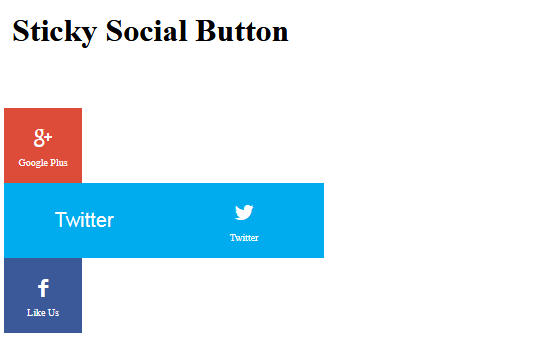
Learn How To Create a Sticky Social Media Bar

In this tutorial, I am going to create a Sticky Social Media Clickable Button Bar using CSS without impacting website design and we I am not using any java script. One can use this code using bootstrap 3 or 4 , foundation or any other framework. Sticky Social Media Bar Screen shot <!DOCTYPE html> <html lang=”en”> […]

Javascript
2 mins read

How to make a BMI Calculator using Pure Javascript

Today I am going to use pure Javascript  to make a web application called BMI Calculator which measures BMI (Body Mass Index). BMI :  According to Wikipedia The BMI is an attempt to quantify the amount of tissue mass (muscle, fat, and bone) in an individual, and then categorize that person as underweight, normal weight, […]

PHP
2 mins read

PHP File Uploading easy to learn tutorial with complete script

PHP is world’s no. 1 server side scripting language, it comes with plenty of features and one of the most famous one is file uploading which is extensively used world wide. Self Explanatory PHP File Uploading Example First Create a directory called  gallary/ . Save this file as gallery.php <!DOCTYPE html> <html lang=”en”> <head> <title>File […]

HTML5
1 min read

HTML5 Audio Tag

HTML 5 natively support audio tag . Now your HTML 5 enable browser supports .ogg ,.mp3 format. So you can implement audio streaming on your HTML5 based website with a little bit of coding and its fairly simple. Browser Compatibility : IE 9, Firefox, Opera, Chrome, and Safari support the <audio> element.   HTML5 Audio […]

CSS
2 mins read

HTML FORM tutorial with CSS based Example

FORMS are used to pass data to a server and contain input elements like text, check box, radio, button, submit, reset, password. A form is incomplete with out input box . Data sent to server through forms using input elements  and executed on the server.Lets have a example of a form <form action=”name.php” method=”post”> <input […]