
For many Linux users, updating their system can feel like a gamble. You hit “install,” cross your fingers, and hope it doesn’t break a working setup or disrupt your workflow. What if updates were risk-free?
Enter ShaniOS, a revolutionary Linux distribution that solves this age-old problem. Designed from the ground up to be bulletproof and immutable, ShaniOS promises a future where “broken updates” are a thing of the past.
Country of Origin: India
Created by Shrinivas Vishnu Kumbhar during M.Tech research at Walchand College of Engineering, Sangli.
Key Takeaway
ShaniOS implements an immutable filesystem with blue-green deployment, making system updates completely safe and instantly reversible with a single reboot.
What is an Immutable OS? A New Paradigm for Reliability
First, let’s demystify the core concept. In a traditional operating system, you have read-write access to the core files; you install and update software by changing them directly. An immutable OS, by contrast, has a read-only core filesystem that cannot be modified during normal operation.
This simple architectural shift brings massive benefits:
- System Stability: The core OS is protected from accidental changes, corruption, or partial updates.
- Enhanced Security: Malware can’t tamper with critical system files.
- Predictable Updates: Updates become atomic, all-or-nothing transactions.
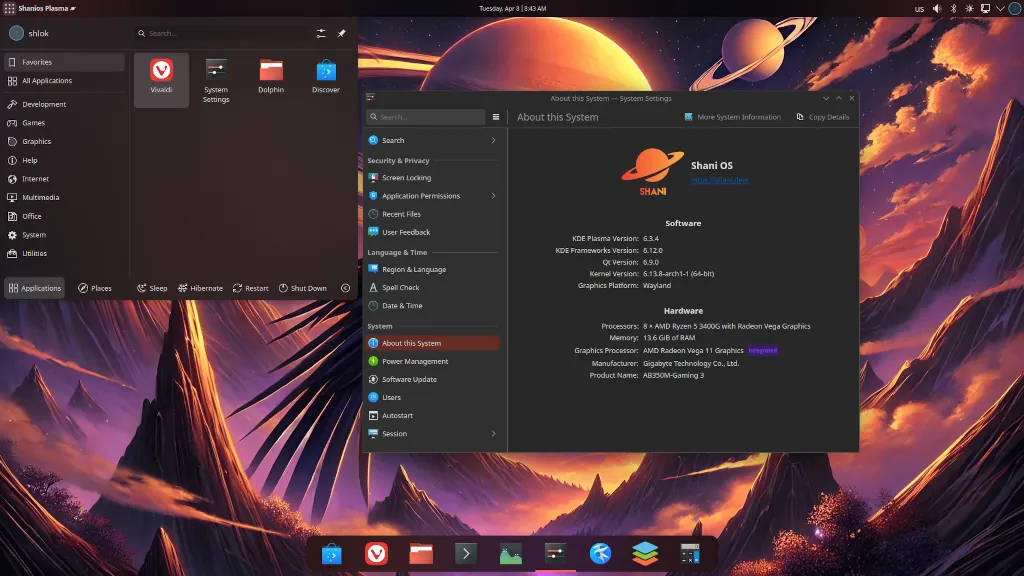
ShaniOS takes this concept and perfects it, making it accessible for desktop users.
The Magic Behind ShaniOS: Blue-Green Deployment
The true genius of ShaniOS isn’t just immutability; it’s how it implements updates. It borrows a battle-tested technique from high-availability web servers called blue-green deployment.
How Blue-Green Deployment Works
ShaniOS maintains two identical system copies, labeled @blue and @green, on separate Btrfs subvolumes. Only one is active at a time.
- Update the Inactive Copy: When you run an update (via the
sudo shani-deploycommand), ShaniOS downloads and applies all changes to the inactive copy of your system. - Test and Switch: After the update, you can reboot into the new environment. If everything works perfectly, you’re done.
- Instant Rollback: If you encounter any issues, simply reboot and select the previous environment. You’re back to your perfectly working system in under a minute.
✨ Key Features and What’s in the Box
ShaniOS isn’t just a proof of concept; it’s a fully-featured, ready-to-use desktop OS.
| Feature | Description | Benefit |
|---|---|---|
| Arch Linux Base | Built on the solid foundation of Arch Linux | Access to cutting-edge software with exceptional stability |
| Pre-loaded Software | Comes with Vivaldi browser, OnlyOffice suite, and drivers | Complete out-of-the-box experience |
| Desktop Options | Available in GNOME and KDE Plasma editions | Choice between streamlined or highly customizable UI |
| Flatpak & AppImage | Primary methods for installing applications | Sandboxed security and portability |
| Container Tools | Includes Distrobox and Podman | Create isolated dev environments without OS conflicts |
| Gaming Ready | Optimized with graphics drivers and Steam support | Excellent for gaming alongside productivity |
Who is ShaniOS For?
| User Type | Why It’s a Great Fit |
|---|---|
| New & Casual Users | It’s incredibly difficult to break. The system protects itself from common errors. |
| Professionals & Developers | Offers a stable, reliable base for work with containerized dev environments. |
| Anyone with Update Anxiety | Eliminates the fear of updates with its foolproof rollback system. |
| Android App Users | Comes with Waydroid pre-installed to run Android applications natively. |
Important Considerations Before You Try
Important Requirements & Limitations
- Installation: Requires a full disk and works best on a clean drive
- Dual-Booting: Can be tricky, especially with Windows, and is not officially recommended
- Software Management: Cannot use
pacmanto install traditional packages to the main system - Technical Requirements: System must have UEFI firmware (not legacy BIOS)
- Storage: Minimum 32GB required, with 64GB recommended
Pro Tip: When creating installation media, the official documentation advises using tools like dd or Balena Etcher and avoiding Ventoy, as it may cause boot issues.
How to Get Started with ShaniOS
Your Installation Roadmap
- Download: Head to the official ShaniOS website and choose your preferred desktop edition (GNOME or KDE Plasma).
- Create Installation Media: Use a tool like Balena Etcher to write the ISO file to a USB drive.
- Install: Boot from the USB. The installer will guide you through the process, which requires dedicating the entire disk to ShaniOS.
- Explore & Update: Once installed, explore the pre-loaded software. When ready for your first bulletproof update, open a terminal and type
sudo shani-deploy.
Final Verdict
ShaniOS is more than just another Linux distribution. It’s a bold reimagining of the desktop OS, prioritizing absolute reliability and user peace of mind. By successfully implementing enterprise-grade deployment strategies for the desktop, it offers a glimpse into a future where your computer is your most dependable tool.
If your top priorities are stability, security, and a worry-free computing experience, ShaniOS is undoubtedly worth a close look. Its innovative approach to system updates alone makes it a fascinating option in the Linux ecosystem.
Related Posts:
 Ubuntu 12.10 failed to impress people
 Parrot Security OS 3.9 ethical hacking Linux distro
Arch based distro Manjaro Linux 17.0.4 launched
Parrot Security OS 3.9 ethical hacking Linux distro
Arch based distro Manjaro Linux 17.0.4 launched
 Install XAMPP on 32/64 bit Linux Distro
 Deepin 15.4 Linux Distro released with brand new design
 9 Things to Do After Installing Kubuntu 24.04 Command Line
 GeckoLinux an OpenSUSE based Linux Distro
 OpenSUSE Team released OpenSuse15.5 Leap
 Installing Oracle JDK 8 , 9 on any Linux distro
 How to install Android Studio on Linux